11 December 2025,
Thursday


11 December 2025,
Thursday

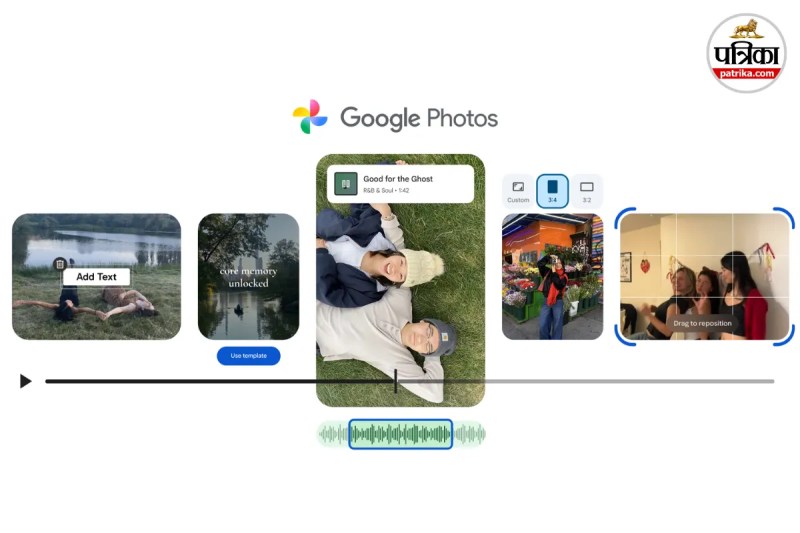
Google Photos Video Editing Features (Image: Google Blog)
Google Photos Video Editing Features: Do you want to combine video clips stored on your mobile to create a fantastic video but are intimidated by the hassle of editing apps? Google has made this task easier for you. Google Photos has released a new update that will transform your ordinary videos into professional highlight videos. The best part is that you don't need to be an editing expert for this.
Google has added new AI-powered video editing tools to its Photos app. Let's explore these 5 new features and how you can use them.
Now, you don't need to spend hours selecting and joining clips. Google Photos now features Quick Highlight templates. These come pre-set with music, text, and transition effects.
How to Use: Simply select your photos and videos, choose a template, and Google will automatically edit and compile the video according to the beat. This is perfect for sharing on social media.
The layout of the video editor has been revamped for both Android and iOS users.
You will now find a universal timeline. This means you can easily drag and drop clips, trim them, and alter the narrative of your video. The new screen makes it simpler to preview how your video is shaping up.
A video feels incomplete without music. Google has now integrated a music library directly within the app.
You can select soundtracks that match the mood of your video. There's no need to download and import music separately. Just listen to the preview and apply it.
Sometimes, just the video isn't enough; you might need titles or captions.
Android users can now add stylish text overlays to their videos. You can also change the font style and colour to make your message stand out on screen.
If you don't want to create a full video but just need to fix a short clip, this new editor works for that too. Open the video from your gallery, tap 'Edit', and add trims, music, or text to prepare it for social media.

Big News
View AllTechnology
Trending